(Load libraries)
# libraries
import numpy as np
import tifffile as tiff
import matplotlib.pyplot as plt
import skimage as sk
import scipyMartijn Wehrens, September 2025
# libraries
import numpy as np
import tifffile as tiff
import matplotlib.pyplot as plt
import skimage as sk
import scipyimage_path = '../images/emoji/emojis-swimming.tif'
img_emoji = tiff.imread(image_path)
_ = plt.imshow(img_emoji)
plt.show()
# Try to segment the "E. moji" image, both the *E. mojis* and the other organism (*S. hark*?) that are present.
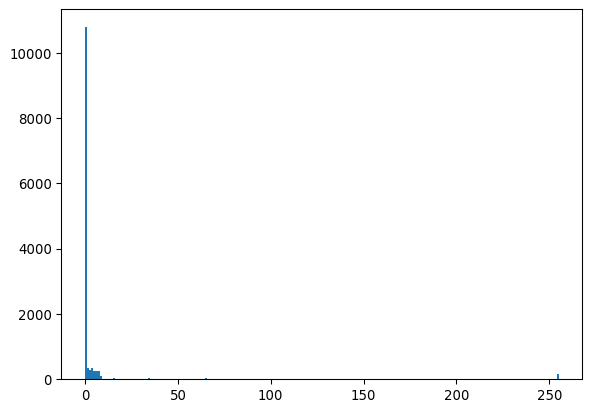
# Let's inspect a histogram first
_ = plt.hist(img_emoji.ravel(), bins=256)
plt.show()
# The peak at 0 is probably background, so simply create mask >0
mask_emoji = img_emoji>0
_ = plt.title("Rudimentary.")
_ = plt.imshow(mask_emoji)
plt.show()
# Optionally, we can remove holes
_ = plt.title("Masks covering the complete objects.")
mask_emoji_noholes = scipy.ndimage.binary_fill_holes(mask_emoji)
_ = plt.imshow(mask_emoji_noholes)
plt.show()
# Make a histogram of the object sizes.
labelmask_emoji = sk.measure.label(mask_emoji)
rprops_emoji = sk.measure.regionprops(labelmask_emoji)
_ = plt.title("Size histogram (red = uncorrected, blue = corrected).")
_ = plt.hist([r.area for r in rprops_emoji], bins=100, color='red')
_ = plt.xlim([0,1000])
# (optionally) add another histogram for the no-holes version
labelmask_emoji_noholes = sk.measure.label(mask_emoji_noholes)
rprops_emoji_noholes = sk.measure.regionprops(labelmask_emoji_noholes)
_ = plt.hist([r.area for r in rprops_emoji_noholes], bins=100, color='blue')
# show
plt.show()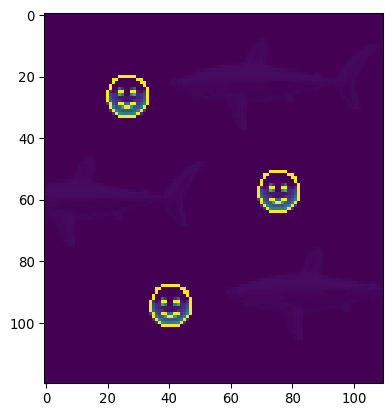
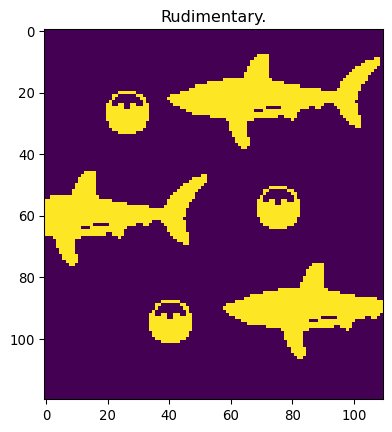
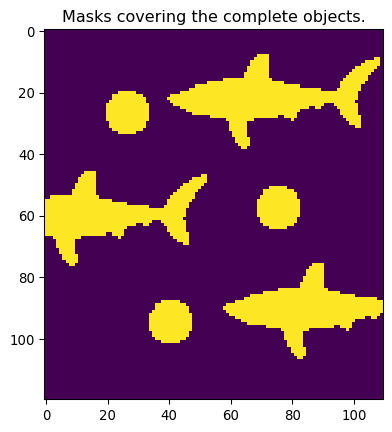
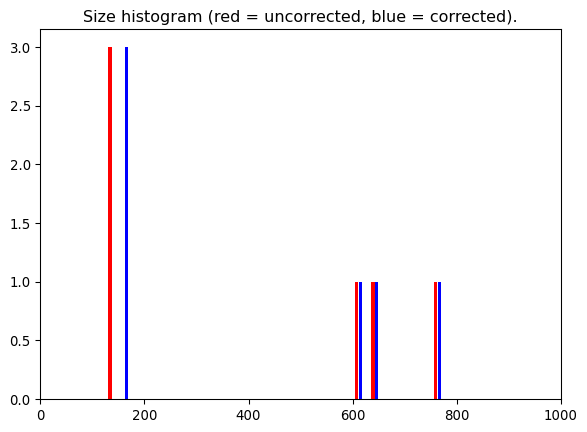
Why does the histogram look the way it does? Let’s first recognize that without the hole-filling, we cannot create a really truthfull mask based on the thresholding alone.
The values in the histogram reflect the size of the different objects. The smiley-faces all have the same object size, hence the big peak. But all the sharks will show a different size, hence the three smaller peaks.
# We made a histogram of nuclear sizes, but the sizes were in pixels. Produce a histogram with the sizes in microns. (You might need a tool like FIJI.)

# Let's reiterate creating the mask and collecting the sizes
img_path_KTR = '/Users/m.wehrens/Data_notbacked/2025_Py-Image-workshop_KTR-example-data/raw/Composite_KTR.tif'
img_nuclei = tiff.imread(img_path_KTR)[0, 0, 0:200, 0:200]
_ = plt.imshow(img_nuclei, cmap='magma')
plt.show()

# Get mask and region properties
mask_nuclei = img_nuclei>700
labeled_nuclei = sk.measure.label(mask_nuclei)
regions = sk.measure.regionprops(labeled_nuclei, intensity_image=img_nuclei)

# From the metadata, we learn the following
pixel_length = 1.1364
pixel_area   = pixel_length**2

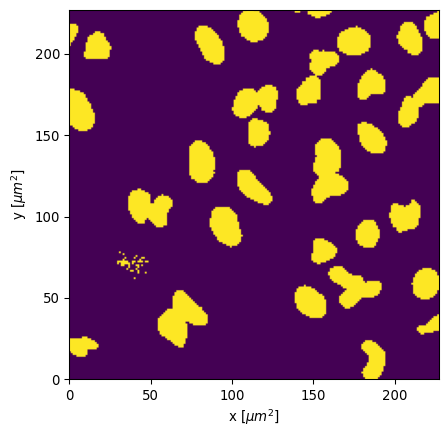
# Show the mask for reference
_ = plt.imshow(
        mask_nuclei,
        extent = [0, mask_nuclei.shape[1]*pixel_length,
                  0, mask_nuclei.shape[0]*pixel_length],
        origin='lower'
    )
_ = plt.xlabel(f"x [$\\mu m^2$]")
_ = plt.ylabel(f"y [$\\mu m^2$]")
plt.show()

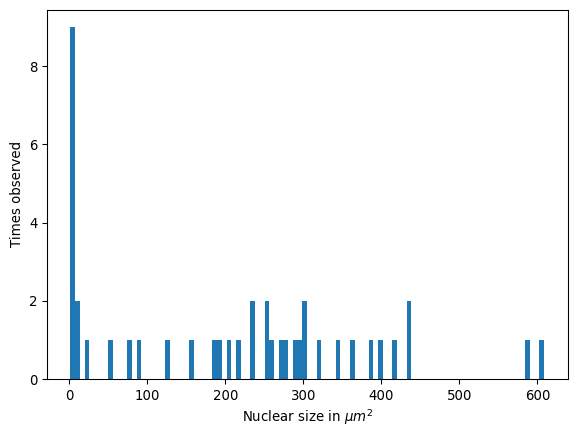
# Now produce a histogram with the real sizes
_ = plt.hist([r.area*pixel_area for r in regions], bins=100)
_ = plt.xlabel(f"Nuclear size in $\\mu m^2$")
_ = plt.ylabel("Times observed")
plt.show()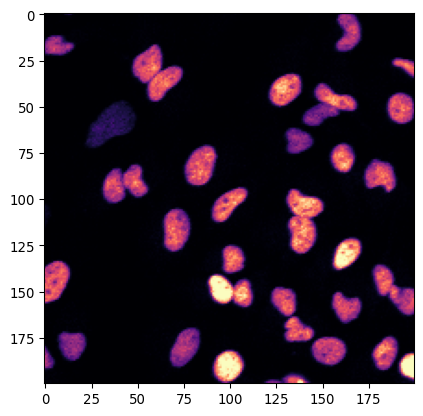
# Can you also add their contours?

# Let's add contours to the original image
_ = plt.imshow(img_nuclei, cmap='magma')
_ = plt.contour(
        mask_nuclei,
        levels = [0.5],
        colors='lightblue',
    )
# And put a cross in their centers
centroids = np.array([r.centroid for r in regions])
_ = plt.plot(centroids[:,1], centroids[:,0], 'xw')

plt.show()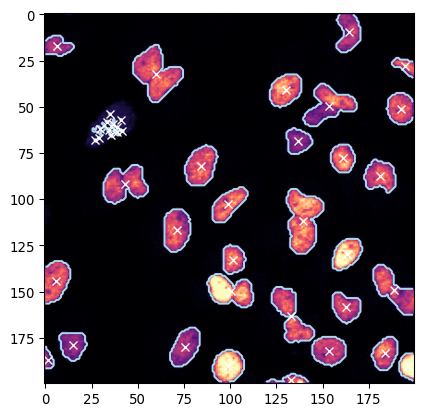
# And now for the color map that clearly shows the mask

# Use the functions `np.random.rand()` and `ListedColormap()` to create a colormap that's a bit more useful to display the labeled nuclei.

from matplotlib.colors import ListedColormap

# Create a random colormap for labeled nuclei
colors = (np.random.rand(len(regions) + 1, 3)+.2)/1.2
colors[0] = [0, 0, 0]  # Background is black
cmap = ListedColormap(colors)

# Display labeled nuclei with the random colormap
_ = plt.imshow(labeled_nuclei, cmap=cmap)
plt.show()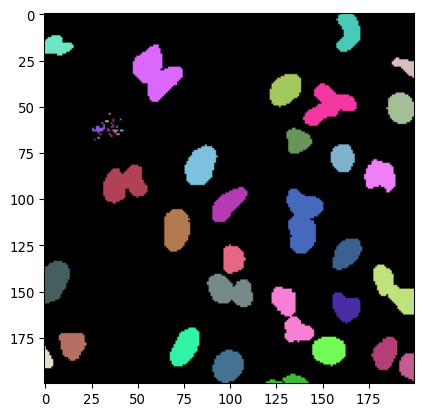
import matplotlib.pyplot as plt
import seaborn as sns
import tifffile as tiff
import numpy as np

import skimage as sk
from scipy import stats
from scipy import ndimage
# Dodgy guys
# Load the picture `images/car/dodgy-guys.tif`
img_dodgy = tiff.imread('../images/car/dodgy-guys.tif')
_=plt.imshow(img_dodgy)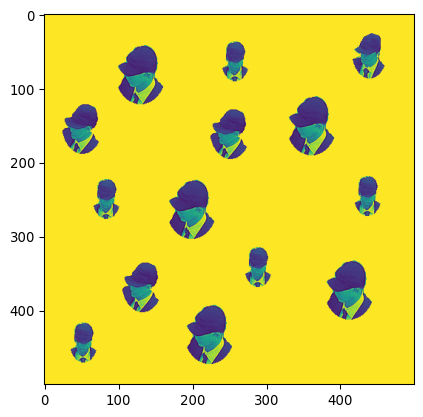
# Can you count the amount of dodgy guys with python?
mask_dodgy_inv = np.max(img_dodgy)-img_dodgy
mask_dodgy = mask_dodgy_inv>2
labeledmask_dodgy = sk.measure.label(mask_dodgy)
np.max(labeledmask_dodgy)np.int32(14)# Can you identify where they are in the image (put a cross in a plot)?
regions_dodgy = sk.measure.regionprops(labeledmask_dodgy)
centroids_dodgy = np.array([r.centroid for r in regions_dodgy])
_=plt.imshow(img_dodgy)
_=plt.plot(centroids_dodgy[:,1], centroids_dodgy[:,0], 'xr')
# Can you put the sizes of each of the heads on top of their heads in a plot?
sizes_dodgy = np.array([r.area for r in regions_dodgy])
for i, size in enumerate(sizes_dodgy):
plt.text(centroids_dodgy[i,1]+10, centroids_dodgy[i,0], str(round(size)), color='red')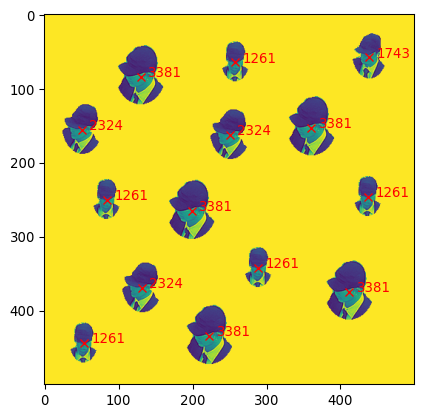
# Can you now easily spot which of the faces only occurs once in this image?
np.unique(sizes_dodgy, return_counts=True)
(array([1261., 1743., 2324., 3381.]), array([5, 1, 3, 5]))So the face corresponding to size 1743 occurs only once.